Introduction
The goal of this tutorial is to learn basic image processing skills using a simple picture of coins on a table. Your task is to identify and count the coins. You can use the following image or take a picture of your own and work with it.
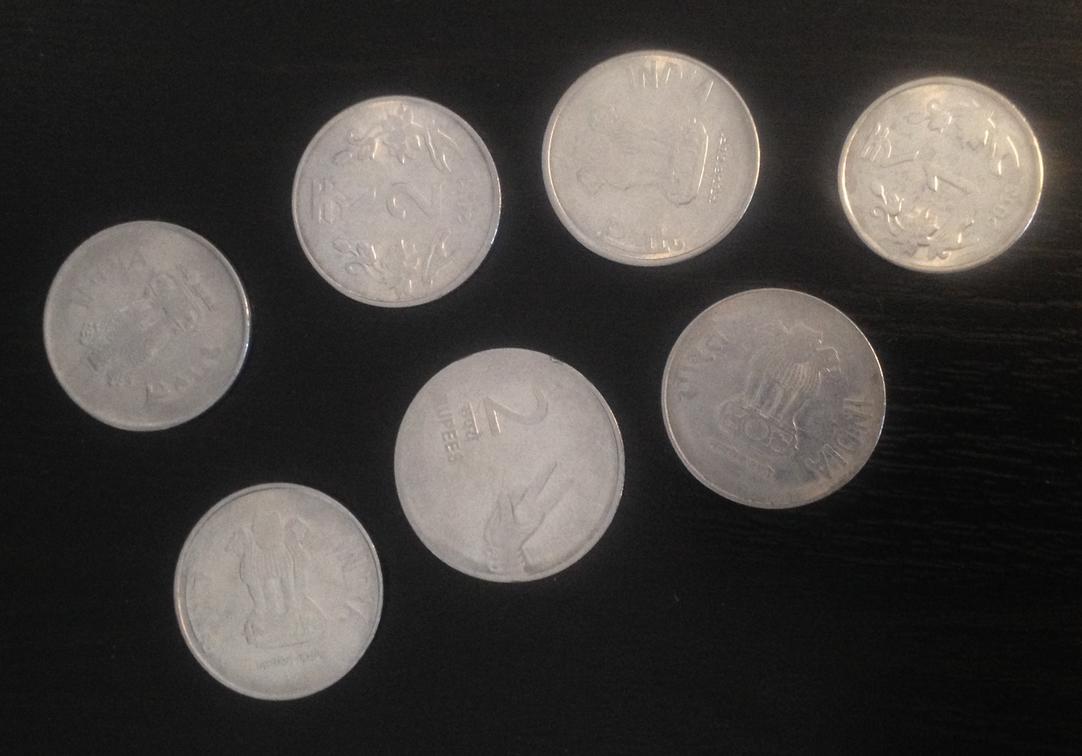
Setup
%matplotlib widget
from skimage import io
import numpy as np
from matplotlib import pyplot as plt
from matplotlib import cm
from scipy import ndimage
import os
Open the file
path = "coins.jpg"
files = os.listdir("./")
if path in files:
    print("Ok, the file is in {0}".format(files))
else:
    print("The file is not in {0} , retry !".format(files))
Ok, the file is in ['dice.jpg', 'coins.jpg', 'HSLA_340.jpg', 'exercises.md', 'image_processing_practical_work.ipynb', 'image_processing_tutorial.ipynb', 'image_processing_practical_work_bonus.ipynb']
im = io.imread(path)
plt.figure()
plt.imshow(im)
plt.show()
Loading...
print(f"The image is a {type(im)}")
print(f"The shape of this numpy array is {im.shape} and the data type is {im.dtype}")
print(f"This image has {im.size} pixels")
print(f"The height is {im.shape[0]} and the width is {im.shape[1]}")
print(f"The image has {im.shape[2]} channels")
The image is a <class 'numpy.ndarray'>
The shape of this numpy array is (756, 1082, 3) and the data type is uint8
This image has 2453976 pixels
The height is 756 and the width is 1082
The image has 3 channels
Plot the histogram
Plot the histogram of the image.
# CODE HEREThresholding
Use thresholding to convert the image to a binary format.
# CODE HEREErosion / Dilation
Use erosion and dilation to clean the image if needed to isolate each coin.
# CODE HERELabeling
Use the labeling (scipy.ndimage.measurements.label) algorithm to isolate each coin.
# CODE HERE