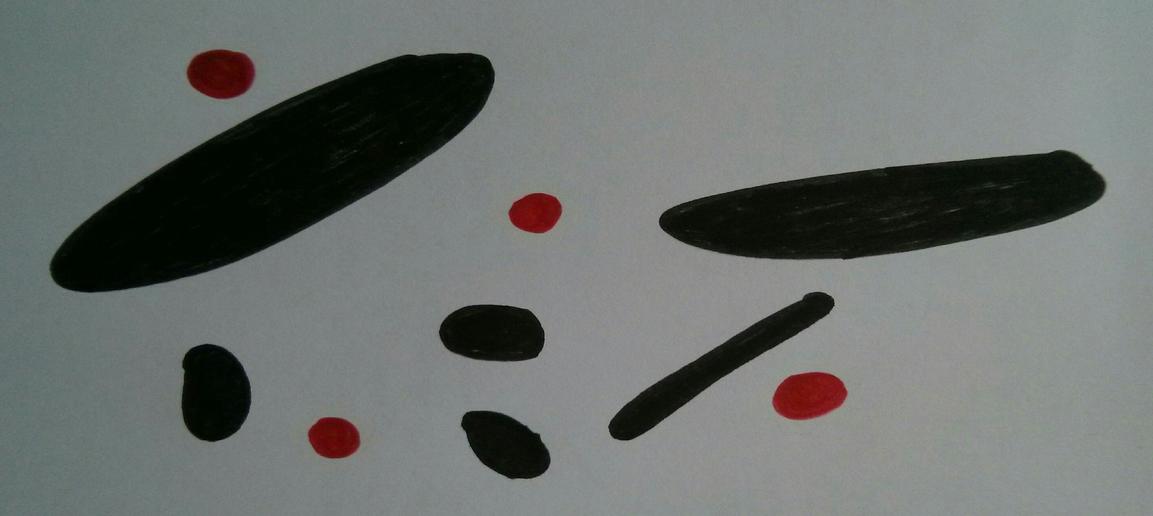
In this example, we show how to use inertia matrix of a given labeled object to find its orientation.
%matplotlib widget
from PIL import Image
import numpy as np
import matplotlib.pyplot as plt
from matplotlib import cm
from scipy import ndimage
import pandas as pd
import os
Matplotlib is building the font cache; this may take a moment.
path = "blobs.jpg"
files = os.listdir("./")
if path in files:
    print("Ok, the file is in {0}".format(files))
else:
    print("The file is not in {0} , retry !".format(files))
Ok, the file is in ['support_material.md', 'blob_orientation.ipynb', 'blobs.jpg', 'rabbit.jpg', 'image_processing_basics.ipynb']
In order to explain the concepts of inertia and aspect ratio, we use this magnificient hand drawing:
im = Image.open(path)
Nc, Nl = im.size
im = im.resize((Nc // 4, Nl // 4))
fig, ax = plt.subplots()
# ax.axis("off")
plt.imshow(im)
plt.colorbar()
plt.show()R, G, B = im.split()
R = np.array(R)
G = np.array(G)
B = np.array(B)plt.figure()
plt.hist(
R.flatten(),
bins=np.arange(256),
histtype="stepfilled",
color="r",
alpha=0.3,
label="Red",
)
plt.hist(
G.flatten(),
bins=np.arange(256),
histtype="stepfilled",
color="g",
alpha=0.3,
label="Green",
)
plt.hist(
B.flatten(),
bins=np.arange(256),
histtype="stepfilled",
color="b",
alpha=0.3,
label="Blue",
)
plt.grid()
plt.legend()
plt.show()Thresholding level is obvious:
Bt = np.where(B < 50, 1, 0)
plt.figure()
plt.imshow(Bt, cmap=cm.gray)
plt.colorbar()
plt.show()Btc = ndimage.binary_closing(Bt, structure=np.ones((5, 5)))
Bl, number = ndimage.label(Btc)
plt.figure()
plt.imshow(np.where(Bl != 0, Bl, np.nan), cmap=cm.jet)
plt.show()
number10obj = ndimage.find_objects(Bl)
len(obj)10Inertia matrix of an object
The object represented bellow is stretched in a direction. Let’s see how we can use its inertia matrix to determine in which direction and how much it is stretched.
plt.figure()
plt.imshow(np.array(im)[obj[1]])
plt.show()The inertia matrix of a 2D object can be defined as follows:
This matrix is symmetric and, as a consequence, it can be diagonalized in a new frame rotated by an angle in the plane. This frame is composed of the two normalized eigenvectors of the matrix. In this frame, the matrix has two eigenvalues ordered so that . Then:
and,
The aspect ratio .
The angle gives the direction of the elongation of the object and shows how much it is elongated. For example, if , the object is not elongated whereas if it is 10 times longer in direction 1 than in direction 2 in an inertial point of view.
data = pd.DataFrame(
    columns=["area", "xg", "yg", "Ixx", "Iyy", "Ixy", "I1", "I2", "theta"]
)
for i in range(len(obj)):
    x, y = np.where(Bl == i + 1)
    xg, yg = x.mean(), y.mean()
    x = x - xg
    y = y - yg
    A = len(x)
    Ixx = (y**2).sum()
    Iyy = (x**2).sum()
    Ixy = (x * y).sum()
    I = np.array([[Ixx, -Ixy], [-Ixy, Iyy]])
    eigvals, eigvecs = np.linalg.eig(I)
    eigvals = abs(eigvals)
    loc = np.argsort(eigvals)[::-1]
    d = eigvecs[loc[0]]
    d *= np.sign(d[0])
    theta = np.degrees(np.arccos(d[1]))
    eigvals = eigvals[loc]
    data.loc[i] = [A, xg, yg, Ixx, Iyy, Ixy, eigvals[0], eigvals[1], theta]
data.sort_values("area", inplace=True, ascending=False)
data["aspect_ratio"] = (data.I1 / data.I2) ** 0.5

data[["area", "theta", "aspect_ratio"]]fig = plt.figure()
counter = 1
for i in data.index.values:
ax = fig.add_subplot(3, 4, counter)
z = Image.fromarray(np.array(im)[obj[i]])
z = z.rotate(-data.loc[i, "theta"] + 90, expand=True)
z = np.array(z)
plt.imshow(z)
plt.title(str(i))
ax.axis("off")
counter += 1
# plt.grid()
plt.show()